


The Lab controls creatively modify the look of the negative. Some simulate real laboratory processes; others are complex transforms that behave differently from traditional color operations and are designed to achieve creatively pleasing results.
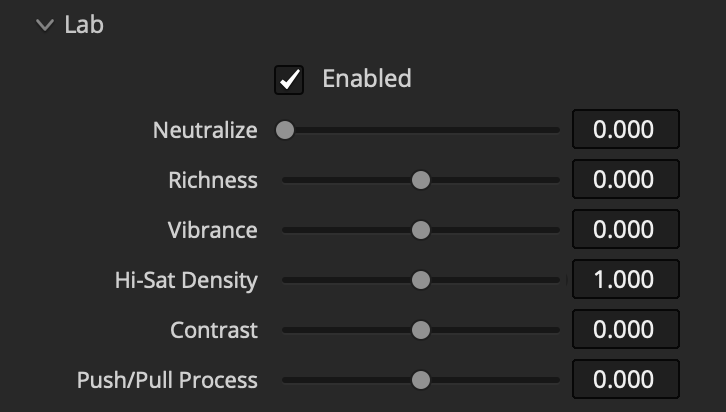
Neutralize
Increasing this reduces tone-dependent color casts inherent to the negative, creating a more neutral gray balance across the tonal range.
Richness
Increasing it makes muted colors more colorful and skin tones richer and more red. It has little influence on already saturated colors. Negative values desaturate muted colors.
Vibrance
Increasing Vibrance produces “richer” darker colors than a traditional saturation operation. It saturates skin tones less than other tones and attempts to prevent over-saturation.
Decreasing Vibrance in the Vision3 system uses a different operation that blends the color response of the color negative with our characterization of the color response of the Double-X black-and-white film negative.
Hi-Sat Density
Adjust the luminance of saturated colors. Negative values make colors brighter while positive values mostly influence extremely saturated colors making them more “pure” and rich with less luma detail which can be more like the response of film but may accentuate sensor clipping.
Contrast
Decreasing contrast reduces highlights and only slightly elevates shadows while maintaining mid-tone exposure.
Since contrast largely affects highlights and Push/Pull affects deep shadows, they work well together when creating low-contrast looks.
Push/Pull Process
Push simulates underexposing a negative and “printing it up” during color timing. The Pull process does the opposite.
This shifts the spatial and photometric characteristics of the negative up or down the image’s tonal range. The most prominent effects are lifted shadows when “pushing,” changes in tonal balance, and variations in how strongly halation influences lower values.
De-Fog
For expired negatives, a De-Fog parameter is provided to counteract lifted shadows caused by aging.

Split Tone
Pushes the color balance in shadows and highlights towards opposite hues while maintaining a neutral middle grey to produce split-tone looks.
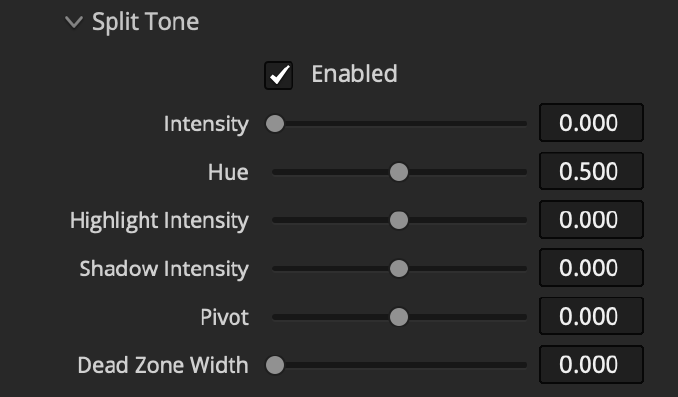
Intensity: Increase how far shadows and highlights are shifted toward opposing hues.
Hue: Choose the hue towards which shadows are pushed (highlights go the opposite way).
Highlight Intensity: Reduce or amplify the intensity in the highlights.
Shadow Intensity: Reduce or amplify the intensity in the shadows.
Pivot: Change the tonal value at which the tones split.
Dead Zone Width: Creates a range of values around the pivot that remain neutral and unaffected by split toning.
Printer Lights
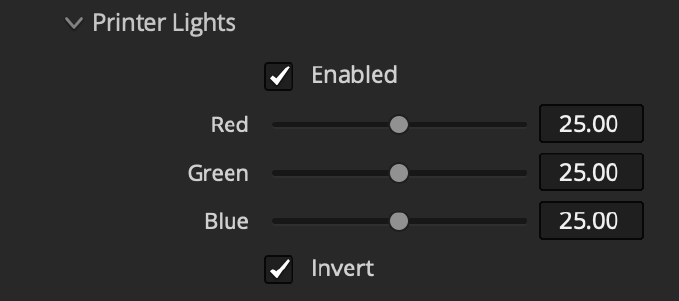
Adjust RGB offset of the negative as it gets “printed.” The values are equivalent to real printer points. About 7 points equal an adjustment of one camera stop depending on the gamma of the negative.
Traditional printer lights are centered around 25 and produce a brighter result with smaller values, which can be counterintuitive, so we provide an option to invert this scale, which is enabled by default.
Acutance
Acutance is the perceived sharpness or micro-contrast of detail, shaped by film chemistry and processing techniques.
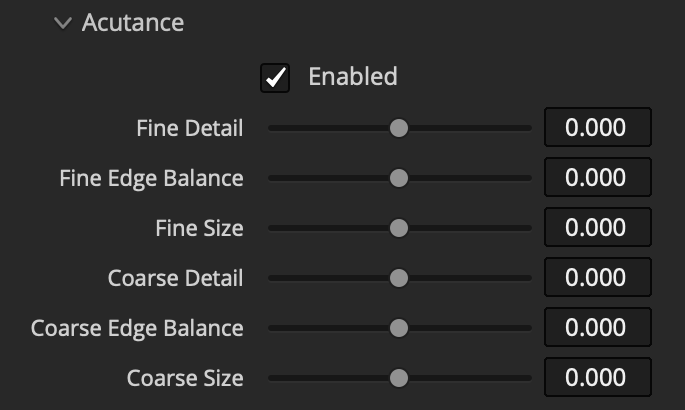
Fine Detail: Adjusts the micro-contrast of the smallest details.
Fine Edge Balance: Adjust how much Fine Detail affects high-contrast edges. Higher values create halos / Mackie lines around high-contrast edges. Lower values concentrate detail adjustment on subtle tonal variations.
Fine Size: Adjusts the size of texture targeted by Fine Detail.
Coarse Detail: Enhances the local contrast of large image structures.
Coarse Edge Balance: Same as Fine Edge Balance for Coarse Detail.
Coarse Size: Adjusts the size of texture targeted by Coarse Detail.
 Made in California