


Grading with Scatter
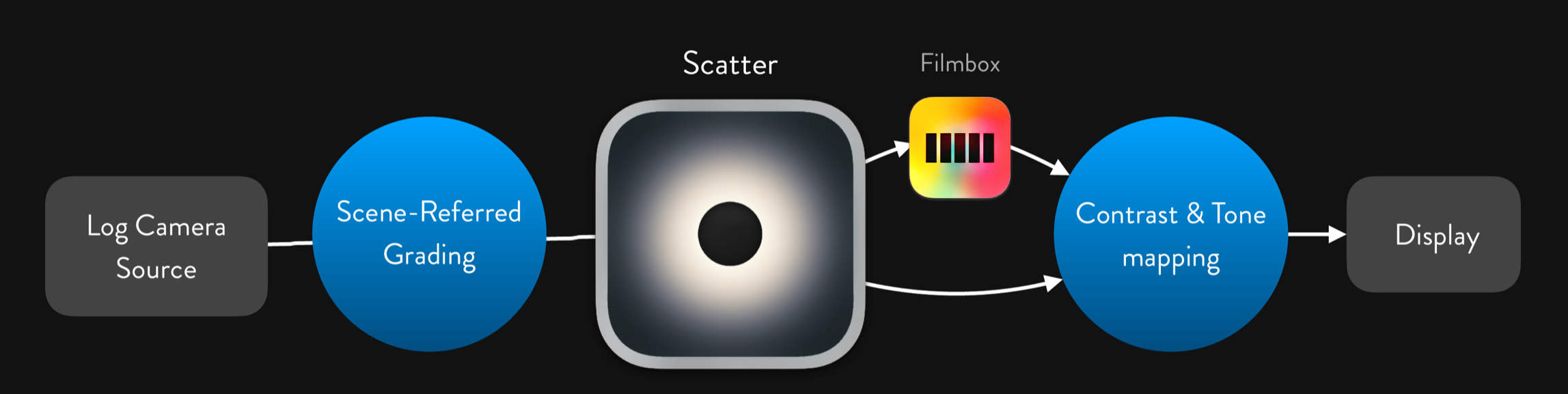
Scatter operates on ungraded footage from a supported camera in its native log colorspace or an intermediate space, and will output a processed image in that same colorspace.
Scatter is physically-based - we’ve calibrated the falloff and intensity of the diffusion for the quantities of light that the scene-referred image represents.
Grading after the Scatter node is analogous to working with footage shot with diffusion burned-in on set. Grading before the Scatter node is analogous to changing the light on set before scattering it through the diffusion filter.
If accuracy is important, only scene-referred operations should be performed before the Diffusion node. Exposure and color balance operations should be done linearly (gain in scene-linear, offset in ACEScc, or using Resolve’s colorspace-aware HDR Global controls.)
Operations like contrast adjustment and tone-mapping before the Scatter node may produce results that are not analogous to real-world physically-based diffusion. But if you like what you see - go for it.
If you are using Filmbox, Scatter should be used up-stream from the Filmbox node.
 Made in California