



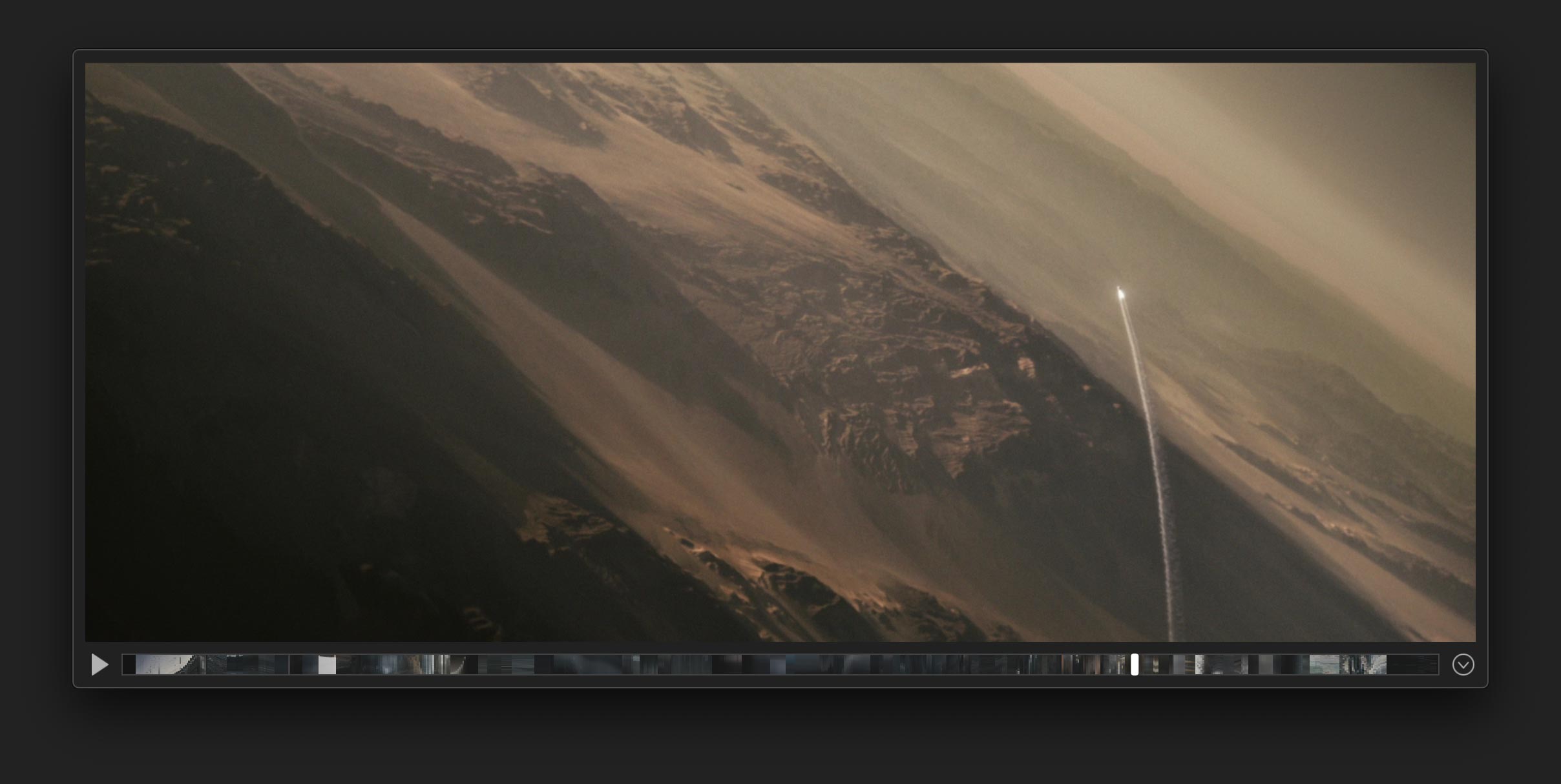
The video player for video people.
Minimal interface with no distractions.
Timecode, LUTs, crops, flops, and all the pro stuff.
Image sequences. RAW. Metadata. Proper keyboard shortcuts.
Super fast exports, screenshots, and a smorgasbord of other delights.
An interface that isn't in your face.
Menus and controls stay out of your way until you need them.
Nothing overlays the video image, so you can focus on your work.
Use the keyboard shortcuts you already have in your muscle memory.
A “barcode” of thumbnails in the timeline lets you navigate huge files effortlessly.
Power tools for video pros.
Play raw video from ProRes RAW, RED and Blackmagic cameras.
Play a sequence of images just like any other video.
Full, accurate timecode support including jump-to-timecode, frame counts, and multiple timecode tracks.
Examine the metadata of any video file.
Zoom in to get a closer view of any frame. Even while playing. Toggle “Pixel Perfect” to see the actual pixels.
Crop the image to any aspect ratio, with or without black bars.
Square pixels? Rectangular pixels? Watch the video with any pixel geometry.
Flip the image horizontally or vertically, or reorient in 90° increments.
Preferences are remembered every time you load a movie, even if you move or rename the file.
A blazing-fast Quick Look plugin for DPX and other image formats.
Import a collection of movies and folders and view them all in the same window.
Full support for the codecs and file types you use every day.
- ARRIRAW (Pre-Alexa 35 only currently)
- AV1
- AVC / XAVC / XFAVC
- Apple Intermediate Codec
- Apple ProRes
- Apple Uncompressed 4:2:2
- Blackmagic RAW
- Canon Cinema RAW
- CineForm
- DNxHD
- DNxHR
- DVCPRO HD
- H.263
- H.264
- H.265 / HEVC
- HAP
- HDV
- MPEG IMX
- REDCODE RAW
- WebM
- XDCAM EX / HD / HD422
- DPX
- EXR
- GIF
- JPEG
- PNG
- TIFF
- WebP
- 3GPP (.3gp)
- Audio Video Interleave (.avi)
- Digital Video (.dv)
- MPEG-2 TS (.m2ts, .ts)
- MPEG-4 (.mp4, .m4v)
- Material Exchange Format (.mxf)
- Matroska (.mkv)
- QuickTime (.mov)
- Apple ProRes 422 HQ
- Apple ProRes 422 LT
- Apple ProRes 422 Proxy
- Apple ProRes 4444
- H.264
- H.265 / HEVC
In Living Color
An optimized color pipeline lets you try looks with ease.
Apply a library of LUTs in real-time to any video.
LUTs embedded in the video file are automatically applied (if you want).
High bit depth. 10, 12, 16-bit? Screen always uses the highest bit depth possible for your video.
Color sampler. Sample the RGB values of any pixel in their native bit depth.
Color management. Bypass color management completely, or view with standard color spaces. Improved color accuracy over QuickTime Player X.
Apply LUTs. Any LUT format supported by Lattice can be applied in Screen.
LUT library. Link to a folder structure with LUTs, or share your DaVinci Resolve LUT folder.
Gamma & exposure. Control gamma and exposure in real time, before or after the LUT.
Channel viewer. Isolate a single channel of the video, including alpha if present.
HDR. Leverage macOS system tonemapping for Pro Display XDR and other EDR displays.
Screen Grab
The best way to make screenshots from video.
Screenshot while playing. Convenient keyboard shortcut for instantly taking screenshots while watching.
Drag-to-screenshot. Hold option and drag frames directly from the video to Finder or other apps.
Timecode in filename. Choose the timecode or frame count (or no suffix) when exporting.
Embed color space. Embed the color space of the video into the image.
Customizable file types. Capture a frame directly to HEIF, JPEG, PNG, TIFF, or OpenEXR.
High bit depth and alpha. Export high bit depth (integer or float) image data and optionally preserve the alpha channel.
Export & Transcode
A simple export system, with the options you actually want.
Common movie codecs. Export H.264, H.265 / HEVC, and all types of ProRes.
In and out points. Set in and out points to trim the length of your video.
Export with LUTs. Export your video with a fresh new look.
Tweakable encoding. Control keyframes and bitrate as you export.
Crop on export. Control crop, letterbox and sizing.
Barcode
Create unique images that show the look of an entire film.
Get a sense of your film's overall look, or just create some cool artwork.
Barcode export. Export a barcode at any resolution straight to an image file.
Playhead. Easily find the part of the video you care about with the barcode visible in the playhead track.
Footage from Others Will Follow used with permission.
 Made in California